- Arduino
- DHT11 or DHT22 sensor
- Breadboard
- 10k ohm resistor
- 3 connecting wires
There are numerous temperature and humidity sensors on the market. Which one you use depends typically on how accurately you want to measure, what connectivity you have and how much you want to spend. Whichever device we use will need to measure the conditions, turn that into a value and return that value to us for for us to use.
Doing
For this class we’ll use a DHT11 sensor, a useful comparison of the different DHT sensors can be found on the Adafruit website here: https://learn.adafruit.com/dht, along with the steps to get their library working. However their tutorial takes the older manual route to installing the library, we’ll use the newer install option directly from the Arduino IDE.
First lets install the library.
Open the Adruino IDE and click Sketch->Include Library->Manage Libraries, this will open the Library Manager. In the Search box, where it says ‘Filter your search..’ type DHT. The list of available libraries will be displayed, there are two at the time this was written.
Click on ‘DHT Sensor Library by Adafruit’ and an Install button will be displayed, click this button to install the library.
Mac Users: On the Mac the Unified Sensor Library is also required. Click in the Search box again and change your search to Adafruit Unified Sensor, scroll down the list until you see ‘Adafruit Unified Sensor Library by Adafruit’, probably near the bottom of the list. Click it and then click the Install button.
Once complete we can close the Library manager and open the sample sketch by selecting File->Examples->DHT sensor library->DHTTester. Then click File -> Save As and save a copy to your directory.
At the top of the example is a section which defines DHTTYPE depending on which sensor we are using, initially it is set as follows:
// Uncomment whatever type you're using!
//#define DHTTYPE DHT11 // DHT 11
#define DHTTYPE DHT22 // DHT 22 (AM2302), AM2321
//#define DHTTYPE DHT21 // DHT 21 (AM2301)
We need to comment out the line for the DHT22 by adding a double slash (//) to the start of the line, and then uncomment the line for the DHT11 by removing the double from the start of the line. The result should be as follows:
// Uncomment whatever type you're using!
#define DHTTYPE DHT11 // DHT 11
//#define DHTTYPE DHT22 // DHT 22 (AM2302), AM2321
//#define DHTTYPE DHT21 // DHT 21 (AM2301)
Plug the Arduino into your computer. Before we compile the code and upload it to the Arduino click the Tools menu option and check that the Board and Port are defined correctly, if not select the correct options for each. Then click the right arrow button to compile and upload the code. You will see the transmit(TX) and receive(RX) lights flash quickly on the Arduino board as the code is transferred. Once this completes the RX light will flash quickly.
Next we need to connect the Arduino to the sensor, but first unplug it from your PC. We load the code first so that the Arduino is in a known state, otherwise there is no telling what was running on there previously and it could affect our sensor.
Here is the wiring diagram (created in Fritzing):
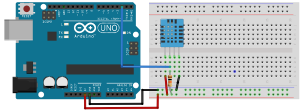
It doesn’t matter which way around the resistor goes. The Sensor Pins are numbered from zero to 3 from left to right when looking at the front of the sensor with the cross hatching on it.
The connections are as follows:
| From | To |
|---|---|
| Arduino pin 2 | Sensor pin 1 |
| Arduino +5v | Breadboard positive rail |
| Arduino GND | Breadboard negative rail |
| Sensor pin 0 | Breadboard positive rail |
| Sensor pin 3 | Breadboard negative rail |
| Sensor pin 1 | Via a 10k ohm resistor to breadboard positive rail |
Then CHECK all of your connections.
Once you’re happy open then connect your Arduino to your computer. Open the Serial Monitor, by clicking Tools->Serial Monitor as this is where the output data from the sensor will be displayed.
You should then see data such as the following displayed in the Serial Monitor:
Humidity: 47.00 % Temperature: 21.00 *C 69.80 *F Heat index: 20.38 *C 68.69 *F
Humidity: 46.00 % Temperature: 21.00 *C 69.80 *F Heat index: 20.36 *C 68.64 *F
Humidity: 47.00 % Temperature: 21.00 *C 69.80 *F Heat index: 20.38 *C 68.69 *F
Humidity: 46.00 % Temperature: 21.00 *C 69.80 *F Heat index: 20.36 *C 68.64 *F
Humidity: 46.00 % Temperature: 21.00 *C 69.80 *F Heat index: 20.36 *C 68.64 *F